|
ATS > Software > Web Programming > Dynamic Web Content |
|
|
|
||
|
||||
The programming language JavaScript lets you manipulate all of the static Web content discussed previously. Many libraries have been built on top of JavaScript to make many tasks easier; jQuery and D3 are two such libraries. “A well-written program is its own Heaven; a poorly-written program is its own Hell.” — The Tao of Programming
JavaScriptJavaScript is a programming language that works with the text, HTML, and CSS of a Web page. It was introduced in 1995, long after the first Web servers appeared in 1991. JavaScript is based on the C programming language, a characteristic it shares with other programming languages such as Java and C’s superset C++, and they will therefore appear similar to each other. Like Java and C++, JavaScript is object-oriented, though it has slightly more restricted capabilities. “JavaScript” is actually a product name of the Netscape Communications Corporation, whose Navigator Web browser evolved into Mozilla Firefox. It was originally named LiveScript but was renamed because of the popularity of the Java language. Variants include JScript from Microsoft and ActionScript from Adobe. It has been standardized by the European Computer Manufacturers Association (ECMA) and is officially known as ECMAScript. The Mozilla Foundation provides a good JavaScript reference. The JavaScript ConsoleYou can start playing around with JavaScript by using the built-in console provided by the different browsers. First open a Web page, e.g. the page doi.html that you were working on previously. Then: Safari
Firefox
Chrome
Internet Explorer
Note that in all of these, the Web Inspector used previously and the JavaScript Console share the same window, so you can click on their names at the top to switch between them. Important: Use the console to try out the following bits of JavaScript code! In the examples below the character Numeric DataJavaScript describes and uses a number of different data types, but the one you are probably most familiar with is numeric data. NumbersJavascript numbers are generally written the same way you would write them for any other purpose: 3 The one exception is that numbers cannot have commas in them, e.g. “5,280” would be interpreted as a sequence of two numbers, “5” and “280”. An additional way that you can write numbers is in scientific notation by using the letter 5.280e3
All numbers are stored as double-precision floating point values, meaning they are accurate up to 15 digits. Numeric OperatorsNumbers can be combined using the binary operators with which you are certainly familiar, addition ( 2 + 3 ⇒ 5 2 * 3 ⇒ 6 Note the use of the asterisk Just as in written arithmetic, the multiplication and division operators have a higher precedence than the addition and subtraction operators, which means they are applied first: 2 + 3 * 4 ⇒ 14 To change this order, use parentheses: (2 + 3) * 4 ⇒ 20 Numbers can be negated with the unary operator - 2 ⇒ -2 The unary operator + 2 ⇒ 2 Again as in written arithmetic, the negation operator has a higher precedence than the binary operators: - 3 + 4 ⇒ 1 -(3 + 4) ⇒ -7 Text DataBecause Web pages are all text, and more generally we use text to provide context to numbers, JavaScript lets you easily work with text data. Character StringsJavaScript text is generally written the same way you would write it for any other purpose, except that you must surround character sequences with either single or double quotes: 'Samuel Adams' Such sequences are commonly referred to as character strings or just strings. Warning: if a string begins with one kind of quote, it must also end with the same kind; this allows the use of the other kind in the middle: "the Laws of Nature and of Nature's God" It’s a good idea to use single quotes when possible to help distinguish JavaScript from the HTML with which it’s often mixed, as the latter commonly uses double quotes for attribute values. Note that curly quotes, String OperatorsTwo strings can be concatenated together with the binary operator '<td><span class="signer">' + 'Samuel Adams' + '</span></td>' ⇒ '<td><span class="signer">Samuel Adams</span></td>' The value in the above is that the HTML tags can be boilerplate information, while the signer names can vary and be inserted in-between as the code comes to them. Using The unary operator +'3.14' ⇒ 3.14 This is also true of the negation operator Warning: For text representations of numbers to convert this way, they must not have any adjacent text other than white space. Anything that cannot be interpreted as a number will result in the value Not-a-Number (NaN), which will propagate through any subsequent calculations. Automatic type conversion can occur in many operations where it makes sense, e.g. numbers in text format will be converted to actual numbers when appropriate: '3.14' * 2 ⇒ 6.28 Note, however, that using binary '3.14' + 2 ⇒ '3.142' To ensure that numbers in text format are converted to actual numbers, precede them by the unary +'3.14' + 2 ⇒ 5.142 The functions parseInt('2.7px') ⇒ 2 parseFloat('2.7px') ⇒ 2.7 Keep this in mind when working with data arriving from the Web, as it will always be character strings to begin with, and you generally don’t know where it’s coming from! Question: How might you quickly convert a numeric value into a character string? VariablesComputer languages gain much of their power by their abilty to reference and manipulate data using symbolic names, called variables. Variable DeclarationAny datum can be assigned to a variable with the assignment operator s = 0 signerOpenTag = '<span class="signer">' signerCloseTag = '</span>' The last two are examples of good descriptive variables that clearly indicate their purpose. They are written in camel case, which removes spaces from phrases and uses uppercase letters to distinguish the beginning of words. Spaces are also commonly replaced by underscores Variables can also be declared using the keyword var signer = 'Samuel Adams' In most cases the keyword The keyword var kingOfGreatBritain ⇒ 'undefined' Variables can be used anywhere that specific values can be used: signerOpenTag + signer + signerCloseTag ⇒ '<span class="signer">Samuel Adams</span>' JavaScript is dynamically typed, so that an existing variable can be reassigned to any other value of any kind: signer = 'John Adams' In many other computer languages one must worry about the consequences of such reassignments because it leaves the previous string stored in memory but (usually) unreferenced, and an accumulation of such data can overwhelm a computer; however, Javascript will automatically remove that data, a process known as garbage collection. To determine the type of a variable, you can use the operator typeof s ⇒ 'number' typeof signer ⇒ 'string' Assignment OperatorsVariables also allow the use of specific operators that both modify the variables and produce new results. For each of the above binary operators there are assignment operators var s = 6 s /= 3 ⇒ 2 This is more efficient than the equivalent operation Assignment operators are a convenient way to buildup strings from pieces that are obtained at different times: var tableCell = '<td>' + signerOpenTag tableCell += signer tableCell += signerCloseTag + '</td>' ⇒'<td><span class="signer">Samuel Adams</span></td>' The basic numeric operators have a higher precedence than assignment operators, including plain assignment, so in these expressions the subtraction and multiplication occur first: s = 4 - 2 ⇒ 2 s += 3 * 2 ⇒ 8 Increment and Decrement OperatorsBecause the particular operations s = 1 ++s ⇒ 2 Here the variable is incremented, and then its result referenced. When these operators are applied following a variable, their values are referenced before they are changed: var t = s-- ⇒ 2 s ⇒ 1 Like negation, these unary operators have a higher precedence than the binary operators: u = ++t + 3 ⇒ 6 Warning: variable operators can only be applied directly to variables: u = ++(t + 3) ⇒ Reference Error Question: What do you think would happen if you applied an increment or decrement operator to a variable containing a character string? JavaScript StatementsThe expressions above all produce some result, but those results can be combined together with other operators to produce other results. The order in which operations occur are summarized in this JavaScript Operator Precedence Table. It’s a good idea to double-check this table until you’re completely familiar with it (and maybe even afterward). The final result of the combination of expressions is a statement, code that completes one particular task. JavaScript statements are usually placed in an HTML
<head> <body> You can also place JavaScript code in external files with a statement like <script type="text/JavaScript" src="doi.js"></script> Inside such a file there should not be a With HTML 5 the attribute Statements can be terminated with a semicolon, as above, but they aren’t usually required, since JavaScript checks syntax, the relative positioning of different elements of the language, to determine where a statement ends. However, it’s a good idea to include them due to the occasional ambiguities that can occur, as well as minimizing occasional programmer confusion. (Using semicolons also allows code-sharing with C, C++, and Java, which do require them.) Semicolons also allow more than one statement on a line, e.g. var s = 1, t = 3; u = s * t; Javascript CommentsYou will want to put explanatory comments in your JavaScript code even more so than with HTML and CSS! Otherwise you will return weeks or months later and not know what you did. See XKCD for an example. JavaScript provides two ways to write comments, one like in CSS that can appear anywhere and cross lines, and is commonly used for longer comments: /* This is a comment. */ The second comment format is unclosed, continuing to the end of the line, and is commonly used for shorter comments: // This is also a comment Boolean DataComparison OperatorsWhen writing programs you will routinely want to make comparisons of variables with other data, to test for particular conditions in order to determine different courses of action, such as deciding which type of calculation to perform or, more generally, branching to different parts of a program. The results of these comparisons we usually think of as being “true” or “false”, and Javascript therefore provides the Boolean data type, which can be one of two values, Comparison operators test for equality ( s = 2 // This is assignment ⇒ true s > 3 ⇒ false signer != 'George Washington' // signer == 'Samuel Adams' — also compare strings! ⇒ true s != 2 * 3 ⇒ true Numeric and string operators have a higher precedence than comparison operators, so in the previous expression the not-equal Logical OperatorsThe logical operators AND (
In plain text, AND is only true && false ⇒ false true || false ⇒ true !false ⇒ true s >= 2 && typeof signer != 'undefined' ⇒ true Note that comparison operators have a higher precedence than logical operators, so in the previous expression the In addition, Automatic type conversions frequently occur in logical expressions , because the empty string true && '' ⇒ '' // string version of false false || 1 ⇒ 1 // numeric version of true Important: Logical operations proceed from left to right, so in an AND expression ( true || '' ⇒ true // no need to evaluate second part; first part is returned 1 && false ⇒ false // second part must evaluated, and its value is returned Collections of DataWhen working with large amounts of data, it’s often convenient to group them together in structures that can be referenced as a unit, but whose components can also be referenced. JavaScript provides two such structures, simple lists called arrays and sets of property-value pairs called objects. ArraysArrays are lists of data that are most simply constructed with square brackets sequence = [ 0, 1, 2, 3, 4 ]; signers = [ 'Samuel Adams', 'John Adams', 'Robert Treat Paine', 'Elbridge Gerry' ]; signerStatus = [ signer, 1776 - 1722, signer == kingOfGreatBritain ] // [ 'Samuel Adams', 54, false ]; Note the difference between Arrays can even include other arrays, which is how you could build a multidimensional array, e.g. this 2 × 3 matrix with two rows and three columns: matrix = [ [0, 1, 2] , [3, 4, 5] ]; Array OperatorsThe individual elements of an array can be selected using the index operator signers = [ 'Samuel Adams', 'John Adams', 'Robert Treat Paine', 'Elbridge Gerry' ]; // length = 4 signers[0] ⇒ 'Samuel Adams' signers[3] ⇒ 'Elbridge Gerry' Referencing the elements of a multi-dimensional array requires as many indices as their are dimensions, each in their own pair of brackets: matrix = [ [0, 1, 2] , [3, 4, 5] ]; matrix[1] ⇒ [3, 4, 5] matrix[1][2] ⇒ 5 Using the index operator you can assign values to the individual elements: signers[2] = 'Rob Paine'; And you can append additional values to the array: signers[4] = 'John Hancock'; The use of square brackets to access the elements of an array can be distinguished from their use to create an array because the former immediately follows an array name; it has a different syntax. ObjectsWhen your list of items is a disparate set, it might be better to use an object instead, which is most simply constructed with curly braces state = { name: 'Massachusetts', capital: 'Boston', "population 1770": 266565, governor: 'Hutchinson' }; Values can, again, be any data type. Property names can also be any data type, but are usually strings, which only need quotes if they include spaces. To make them more compatible with other programming languages (e.g. SQL), double-quotes are recommended. An array is actually a special type of object with indices that are numeric values: typeof signers ⇒ 'object' Warning: objects look similar to CSS styles, but use commas instead of semicolons, and cannot have a trailing comma. Object OperatorsThe individual elements in an object can be selected using the property operator state = { name: 'Massachusetts', capital: 'Boston', "population 1770": 266565, governor: 'Hutchinson' }; state.name ⇒ 'Massachusetts' This won’t work if the property name has spaces in it, but you can also aways use the alternative square bracket notation where the index value is the property name: state["population 1770"] ⇒ 266565 You can use this with any property (including the numeric properties used by array objects, e.g. As with arrays, you can assign values to the individual elements to replace previous values: state.governor = 'Baker'; And you can append additional values: state["population 2010"] = 6.646e6; Array and Object LengthIn addition to using numeric indices, array objects always include a property signers.length ⇒ 5 To get the length of a more general object, you can request its set of properties with the function Object.keys(state) ⇒ [ "name", "capital", "population 1770", "governor", "population 2010" ] Object.keys(state).length ⇒ 5 Equivalently you could use the function Object.values(state) ⇒ [ "Massachusetts", "Boston", 266565, "Baker", 6646000 ] JSONArrays and objects are commonly used together to represent tables in a format known as JavaScript Object Notation (JSON): states = [ states[2].capital ⇒ 'Providence' Rather than a array of objects as above, one might also use an object whose values are also all objects: states = { states["New Hampshire"].capital ⇒ 'Portsmouth' Control StructuresA common task in programming is to sequentially step through a set of values, usually stored in an array or object, and do something to each one. The for…in StatementThe simplest control structure is the var state = { name: 'Massachusetts', capital: 'Boston', "population 1770": 266565, governor: 'Baker', "population 2010": 6.646e6 }; for (property in state) ⇒ This structure is commonly called a loop because after it executes each statement it “loops back” to the While you can type simple statements into the JavaScript console and it will simply print them back for you, inside of a loop you must wrap them inside the expression Warning: there is no guarantee that the order that items are listed in an object are the same order that they’ll come back out. Instead of a single statement following the for (property in state) ⇒ In this example, The use of curly braces The for StatementYou can also loop through a set of values in a sequential fashion using the just-plain for statement: signers = [ 'Samuel Adams', 'John Adams', 'Robert Treat Paine', 'Elbridge Gerry' ]; // length = 4 for (s = 0; s < signers.length; s++) ⇒ The three statements in the parentheses following the keyword
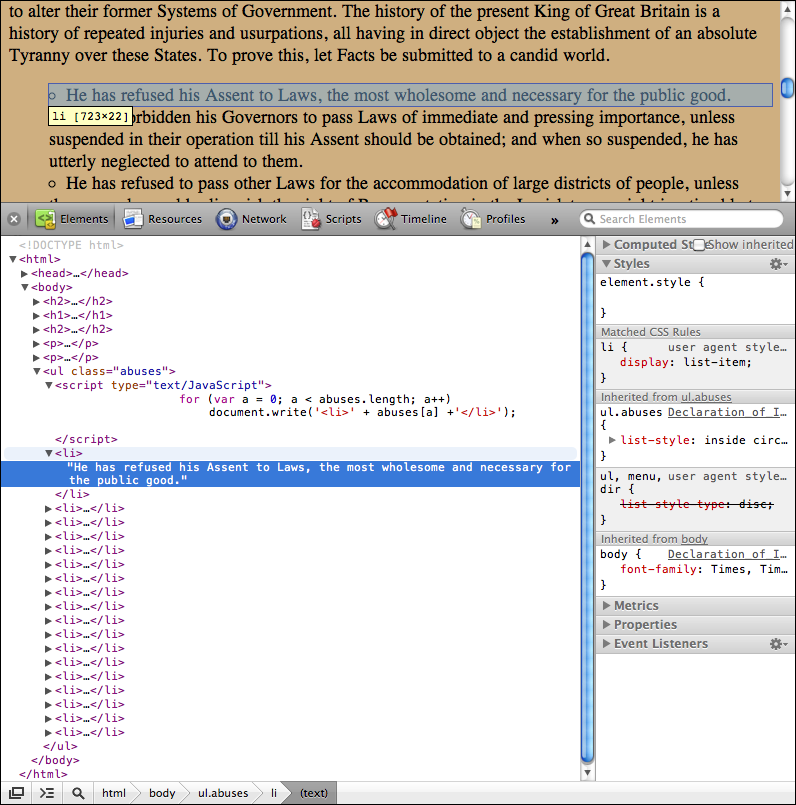
This particular set of initialization, test, and update statements are commonly used for arrays, however the only requirement is that the result of the test is something that can be evaluated as Warning: every for loop should at some point reach a test that is The if…else StatementVery commonly you will want to test the values of variables and then evaluate a statement or block of statements depending on whether the comparison is signers = [ 'Samuel Adams', 'John Adams', 'Robert Treat Paine', 'Elbridge Gerry', 'Paul Revere' ]; if (signers.length < 5) ⇒ 'Warning: The Massachusetts Delegation is trying to send Paul Revere in place of John Hancock!' Note that the statement following the optional Also note that the braces are necessary to associate the second Also note that logical testing can be very involved sometimes! When you combine the for (s = 0; s < signers.length; s++) ⇒ Modifying Web Pages with JavaScriptAn important use of loops is to handle the repetitive output of parts of a Web page, for example to print out in a uniform fashion an array of strings such as http://ats.amherst.edu/software/web/dynamic/doiabuses.js: var abuses = [ "He has refused his Assent to Laws, the most wholesome and necessary for the public good.", "...." ] If you place such a file in a subfolder named <script src="doiabuses.js"></script> Then a list can be constructed by inserting JavaScript at the appropriate point in the Web page using the function <ul class="abuse"> ⇒ The JavaScript code in the If you look at the Web console in your browser, you’ll see both the JavaScript statement and the HTML elements it inserts into the Web page:
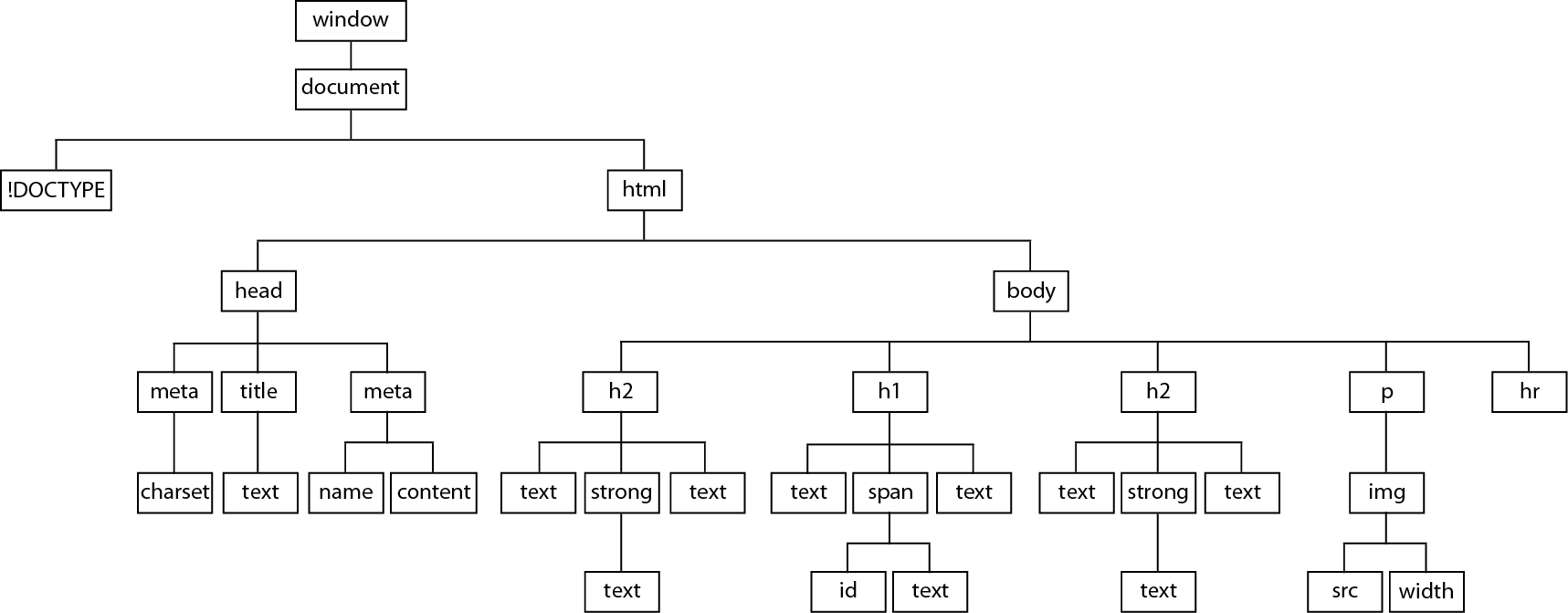
Multiple Loops in a ListThe Declaration’s list of abuses actually contains a sublist of “pretended Legislation”; the variant file http://ats.amherst.edu/software/web/dynamic/doiabuses2.js includes them as an array with an array: var abuses = [ We can rewrite the code we used previously to test for an array instead of a string, and if present include another loop that writes a sub-list instead of just outputting a string: <ul class="abuse"> Lists inside of lists are further indented, and use different symbols to distinguish them (though they have been suppressed in this case). Note that the attribute Problem 4: Multiple Loops in a TableThe Declaration’s table of signers can be saved in its own file as a JSON array of arrays: var signers = [ Write code to step through these arrays to create a table in the format shown in the previous chapter. FunctionsFunctions are a way to package blocks of statements so that you can hand them a set of values, from which they may return a calculated result or produce some other effect. We’ve already seen a number of built-in JavaScript functions like Function definitions are commonly placed in the Constructing FunctionsFunction definitions all begin with the keyword For example, a function to test if a person is one of the signers of the Declaration can be written with a statement like: function issigner(person) where The function expression will be replaced in its surrounding statement by its return value, which is the value following the keyword issigner('Hancock') ⇒ true Function arguments such as By declaring the variable Anonymous FunctionsIt’s also possible to define anonymous functions using an expression rather than a statement as above, so that the result can be assigned to variables. The above could have been written: issigner = function(person) { /* Statements here */ } Anonymous functions can be assigned to properties of objects, when they are commonly called methods of the object, and they are automatically provided with a reference to the object in the variable state = { state: 'Massachusetts', capital: 'Boston', "population 1770": 266565, governor: 'Baker', "population 2010": 6.646e6 }; state.display = function() { return this.capital + ', ' + this.state } state.display() ⇒ "Boston, Massachusetts" The method above requires no arguments, but must still have an empty set of parentheses if you want to get something out of it (as opposed to just passing it around as the function reference Question: We have already been using an object method on a regular basis; can you think of what it is? Also a couple of others occasionally! Problem 5: Object MethodsCreate a method for the following object that prints out the population for a given year: state = { state: 'Massachusetts', capital: 'Boston', "population 1770": 266565, governor: 'Baker', "population 2010": 6.646e6 }; Callback FunctionsYou will also often see function references handed as arguments to other functions, when they are known as callbacks. They can be either named functions or anonymous functions. For example, a useful array method, signers.map(function(item) { return item.split(' ').pop(); }) ⇒ This method allows you to hand the array a callback function that is applied to each item in the array in turn. The callback here receives each element of the array of signer names through the argument The full specification of the callback in this case is Problem 6: A Programmatic FlagRewrite the earlier SVG for the US flag so that its repetitive pieces are generated by JavaScript. Warning: there is a common browser bug that blocks The Document Object ModelWhen a Web browser loads an HTML document, it parses (interprets) the HTML and builds a set of programmable objects for every element and the content they enclose. These document objects can then be directly read or written using JavaScript. The Document HierarchyAs noted previously, an HTML document has a hierarchical structure, with many elements being containers of content, attributes, and other elements, collectively known as nodes: <!DOCTYPE HTML>
In the Document Object Model (DOM) we refer to the relationships between different nodes with familial terms. For example, the Every element in this hierarchy is an object, with a set of properties and methods that can be read and sometimes set with JavaScript. There are a few standard elements, such as document.title // Type this into the console! ⇒ "The Declaration of Independence" Most other elements must be looked up in some way, commonly by letting the document find them for you, from an index it creates as it parses the document: dec = document.getElementById('declaration') ⇒ <span id="declaration">declaration</span> You can obtain a lot information about an element from the properties of its representative object, for example: dec.id ⇒ "declaration" dec.nodeType // 1 for an element, 3 for text, 8 for comments, 9 for document, 10 for <!DOCTYPE> ⇒ 1 dec.nodeName ⇒ "span" If you know the relative location of two elements, you can also climb up and down the node tree: h1 = dec.parentNode ⇒ <h1> dectext = dec.firstChild ⇒ #text "declaration" Note that, while in the second case dectext.nodeName ⇒ "#text" dectext.nodeValue ⇒ "declaration" For any element you can request an array of its child nodes: h1.childNodes // array of all child nodes of the H1, include dec ⇒ [ 'the unanimous ', <span id="declaration">declaration</span>, ' of the' ] Sometimes you must loop through them and test their contents to find the right one. In addition to searching for identified elements, you can request arrays of specific element types: image = document.getElementsByTagName('img')[1]; // array of img elements in document; select second ⇒ <img src="john_hancock_signature.jpg" width="30%" /> Attributes can be accessed in a couple of ways: image.getAttribute('src'); ⇒ "john_hancock_signature.jpg" image.attributes[0]; // second item in an array of attributes ⇒ src="john_hancock_signature.jpg" image.attributes[0].value; ⇒ "john_hancock_signature.jpg" There are a number of such properties and methods available, so if you need a capability, look for it, you just might find it! Modifying the DOM
dectext = document.getElementById('declaration').firstChild; ⇒ "announcement" Attributes can also be set this way (if they already exist; otherwise they must first be created): image = document.getElementsByTagName('img')[1]; ⇒ "50%" image.attributes[2].value = '40%'; ⇒ "40%" In addition to modifying the values of nodes and attributes, the document model itself can be modified by adding or removing nodes, using a set of predefined methods. As one example: var newEm = document.createElement('em') newEm.appendChild(document.createTextNode('John Hancock')) newEm ⇒ "<em>John Hancock</em>" image.parentNode.appendChild(newEm) // inserts after last child of the <p> containing image Again, there are a number of such properties and methods available, so if you need something, look for it. Many of them are non-standard but commonly available in browsers, e.g. You may wonder, why go to all of the trouble to modify the DOM using these methods when it’s simpler to use document.write('<em>John Hancock</em>')
Procedure: Multiple Loops in a List Using DOM MethodsWe can rewrite the code for the list of abuses to use DOM methods rather than
<ul id=abuses class="abuse"></ul> <script> <script> <script> DOM LibrariesThe process of modifying the DOM is greatly assisted by the use of libraries of JavaScript functions such as jQuery and D3, which have become extremely popular in recent years. They provide a streamlined interface for manipulating the DOM that is known in general as an Application Programming Interface (API). jQuery is described as “a fast, small, and feature-rich JavaScript library [that] makes things like HTML document traversal and manipulation … much simpler with an easy-to-use API that works across a multitude of browsers.” The most recent version, designed for more recent browsers, weighs in at 246 KB (86 KB compressed). D3 or “Data-Driven Documents” is described as “a JavaScript library for manipulating documents based on data [helping bring them] to life using HTML, SVG and CSS. D3’s emphasis on Web standards gives you the full capabilities of modern browsers without tying yourself to a proprietary framework, combining powerful visualization components and a data-driven approach to DOM manipulation”. It is somewhat larger than jQuery at 319 KB (144 KB compressed). One primary advantage of these libraries is that they can hide some of the inconsistencies of different Web browsers, automatically using work-arounds when necessary. D3 is newer, though, and with the recent convergence on a more standardized Web it provides somewhat less backward compatibility. The DOM Library jQueryInstalling jQuery
The minimal (compressed) version will be faster to load because it shortens variable names and removes all unnecessary space from the library, making it smaller but also avoiding unnecessary Documentation for jQuery’s API is also available from the same site. To use jQuery in a Web page, just place this library reference (or something similar if you’re using a different version) somewhere in the page: <script src="js/jquery-3.7.1.min.js"></script> It could be placed in the Examining the DOM Using jQueryjQuery is provided to your Web page as an object with many methods, and it can be referenced either with jQuery uses the notation of CSS selectors to find elements of interest and provides streamlined methods to operate on them. For example, instead of the previous cases where we used declaration = $('#declaration') // Selects the element with this ID Similarly we can use the signers = $('.signer') // Selects all elements with the class="signer" With no leading special character and the name of an element, jQuery will select elements with that name using images = $('img') // Selects all image elements The result of these expressions is a jQuery selection object that contains the matched elements as numbered properties (so that it behaves like an array), along with additional information that jQuery can later reference. signers[6] // Returns just the seventh element The above result is the DOM element itself; jQuery also provides its own method signers.eq(6) The advantage of continuing to use a jQuery selection is that you can keep using its methods, e.g. to determine an element’s text content as an alternative to using signers.eq(6).text() Or to determine a particular attribute’s value: sigImg = images.eq(1) Selecting just the contents of nodes is simplified: signers.contents() And then you can find particular values using a filter, similar to using signers.contents().filter( Notice the chaining of methods together here, the result of each method is passed on to the next, which works as long as they produce a jQuery selection object. Modifying the DOM Using jQueryTo set an attribute, use the sigImg.attr('title', 'John Hancock’s “John Hancock”') Finally, creating and inserting new elements into the DOM is much easier:
trueCopy = $('<span>') Be aware that the method sigImg.before(trueCopy) An alternative to the latter are the methods newElement trueCopy = $('<span>') If a sibling is not known, or if there are none, the parent of the “future child” must be determined and used as the base object, with one of a number of approaches:
Using jQuery we can redo the generation of the list of abuses as follows:
<ul class="abuse"></ul> <!-- Provide an anchoring element for the following script to reference --> Warning: because the browser loads the HTML in order and this jQuery code references this particular This JavaScript code affects the visibility of the document text; otherwise, such code is commonly placed at the end of the document between the If the code doesn’t refer to specific elements, e.g. defining variables and functions, it can also be placed in a separate .js file that’s referenced in the document jQuery SummaryjQuery uses CSS selector notation to determine what you are trying to do when you call it:
jQuery selections are arrays of objects that provide references to the matching elements, along with many methods to query and transform them. Once you have a jQuery selection of elements, you can “chain” methods to it to narrow the selection or find related elements, for example:
You can also “chain” other methods to query or transform them, for example:
If you have created a new element with
The second example in each case allows chaining from the original creation expression, e.g. Problem 7J: Multiple Loops in a Table, RepriseRewrite Problem 4: Multiple Loops in a Table to use jQuery rather than The DOM Library D3Installing D3You can obtain D3 from the Web site http://d3js.org/. Get the latest version and install it in the same doi folder as your main document, but in a subfolder named To use D3 in a Web page, just place this statement (or something similar if you’re using a different folder) somewhere in the page: <script src="js/d3/d3.min.js" charset="utf-8"></script> This could be placed in the The minimal (compressed) version will be faster to load because it shortens variable names and removes all unnecessary space from the library, making it smaller but also avoiding unnecessary Note that D3 requires the UTF-8 character set; if this is established in the header of your document as described earlier, the attribute in the script element above is unnecessary. Modifying the DOM Using D3D3 makes it somewhat simpler to modify pieces of a document, by using the notation of CSS selectors to find elements of interest and by providing streamlined methods to operate on them. For example, in the previous cases: d3.select('#declaration').text('announcement'); // Selects the element with this id ⇒ "announcement" d3.select('img').attr('width', '40%'); // Selects the first <img> element found ⇒ "40%" We can also select existing node references, and easily add elements within them: image = document.getElementsByTagName('img')[1]; ⇒ The power of D3 can be seen by revisiting the list of King George’s abuses: <script src="js/doiabuses.js"></script> which we earlier wrote into the document using straight JavaScript and the CSS class selector <ul> If we uniquely identify this <ul id="abuses"></ul> then we can use D3 to replace the above script with a single expression, using a set of methods chained together: <script> This statement should be placed somewhere after the loading of the D3 library. The result of each D3 method is a set of element references called a D3 selection, which is then operated on by subsequent methods in the chain, as follows:
The result is a simple and powerful procedure for building parts of Web pages. Procedure: Inserting Data into the DOM Using D3
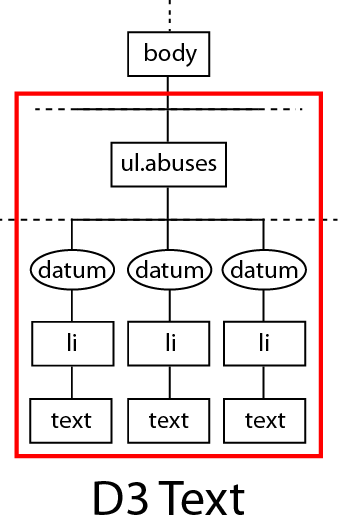
selection = d3.select('ul#abuses') ⇒ [ Array[1] ] The To select all elements matching a selector, use The found elements are returned, along with references to their parents, as a D3 selection, which is an array of arrays of child elements, one array per parent element. In the example above, the one array returned corresponds to Once the location in the document is selected, we can narrow the search to descendant elements that are of the particular type we want to insert our data into: selection = d3.select('ul#abuses').selectAll('li') ⇒ [ Array[0] ] If no matching elements are found, the D3 selection will consist of the previous set of child elements, now reselected as parent elements, ready to have child elements added to the sub-array. In the example above, the one parent element returned is data = selection.data(abuses) ⇒ [ Array[18] ] containers = data.enter().append('li') ⇒ [ Array[18] ] The data is now associated, one-to-one, with the containing elements, but is still just a part of the D3 selection, and is not yet visible on the page. containers.attr('class', 'abuse') ⇒ [ Array[18] ] containers.text(String) ⇒ The method Problem 7D: Multiple Loops in a Table, RepriseWrite the table of Declaration signers using D3. The data is in http://ats.amherst.edu/software/web/dynamic/doisigners.js and is stored as an array of arrays of states and their signers (another JSON format), which are also stored in an array: [ Hint: D3’s Another Hint: There’s also a JavaScript method to join an array of strings into a string! Challenge: Sometimes you need to do more than just return some text, in which case the D3 method Making a Diagram Using D3We can express the same set of data described in the previous problem using objects, stored in http://ats.amherst.edu/software/web/dynamic/doisigners2.js , which provide labels that could be used in a graphic tree structure: var signers = { This has a clear hierarchical structure using an object with two properties, The basic procedure for creating trees is described in this set of D3 documentation, but it’s generally helpful to start with some example code such as this. Transformed for our purposes: Problem 8: A D3 SunburstAn alternative tree display format is the Sunburst: It has the same data format as the tree above, but with the keyword var signers = {
|
|||||||||||||||||||||||||||||||||||
|
|
 Some of the document and element properties above are directly modifiable:
 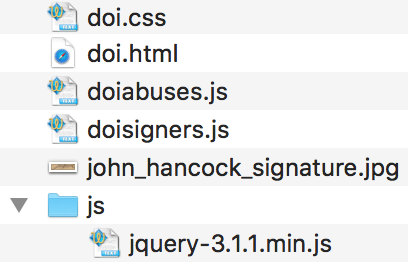 You can obtain jQuery from the Web site
 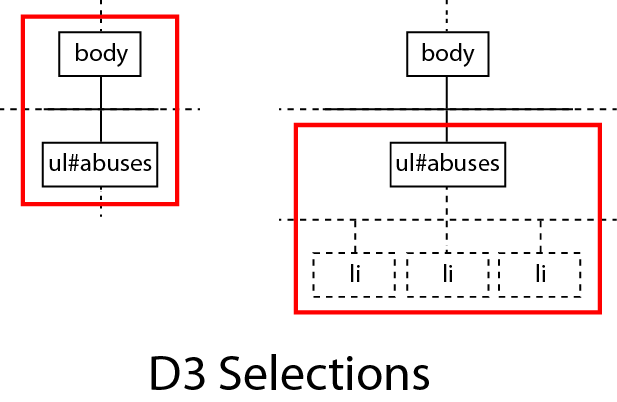 To select the data container elements, you can use
 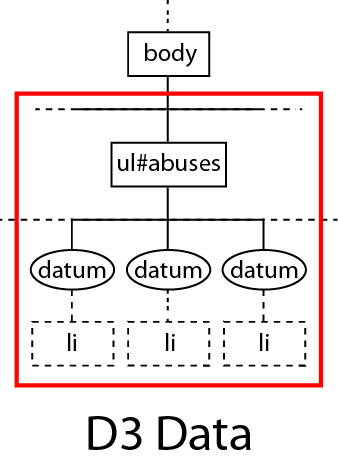 Once the D3 selection is set, additional containing elements can be appended to the parents as necessary. To determine how many containing elements are actually required, we attach the list of data to the selection, e.g. the 18 abuses:
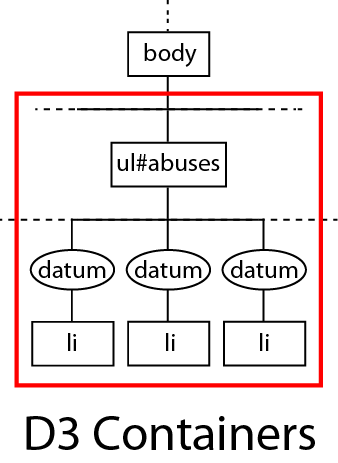 To now create just enough containing elements, we apply the methods